
H3C LSW1FC4P0 Interface Card for S5820X-28C Ethernet Switches Command Line Interface Guide Firmware Version 9.0.7


Command Reference
User
59272-00 C 303
User
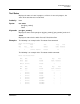
Administers and displays user accounts.
Authority Admin account name and an Admin session. The Accounts and List keywords are
available to all account names without an Admin session.
Syntax user
accounts
add
del
ete [account_name]
edit
list brief
Keywords accounts
Displays all user accounts that exist on the
Switch Module. This keyword is
available to all account names without an Admin session.
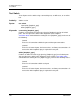
add
Add a user account to the
Switch Module. You will be prompted for an account
name, a password, authority, and an expiration date.
A
Switch Module can have a maximum of 15 user accounts.
Account names are limited to 15 characters; passwords must be 8–20
characters.
Admin authority grants permission to use the Admin command to open an
Admin session, from which all commands can be entered. Without Admin
authority, you are limited to view-only commands.
The expiration date is expressed in the number of days until the account
expires (2000 maximum). The
Switch Module will issue an expiration alarm
every day for seven days prior to expiration. 0 (zero) specifies that the
account has no expiration date.
del
ete [account_name]
Deletes the account name given by [account_name] from the
Switch Module.
edit
Initiates an edit session that prompts you for the account name for which to
change the expiration date and authority.
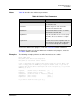
list brief
Displays the list of users currently logged in, the login date, and the login time.
The User List command is equivalent to the Show Users command. This keyword
is available to all account names without an Admin session. To display just the
account name and client, enter the User List Brief command.