
H3C LSW1FC4P0 Interface Card for S5820X-28C Ethernet Switches Command Line Interface Guide Firmware Version 9.0.7


Command Reference
Test Switch
59272-00 C 301
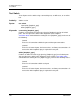
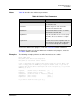
Notes Table 40 describes the switch test parameters.
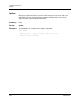
To cancel a switch test in progress, enter the Test Cancel Switch command.
To display the status of a recent switch test or switch test in progress, enter the
Test Status Switch command.
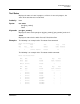
Examples The following example performs an offline internal test on a switch:
H3C #> admin start
H3C (admin) #>set switch state diagnostics
H3C (admin) #> test switch offline internal
A list of attributes with formatting and current values will follow. Enter a new
value or simply press the ENTER key to accept the default value. If you wish to
terminate this process before reaching the end of the list press 'q' or 'Q' and the
ENTER key to do so.
LoopCount (decimal value, 1-4294967295) [100 ]
FrameSize (decimal value, 40-2148) [256 ]
DataPattern (32-bit hex value or 'Default') [Default]
StopOnError (True / False) [True ]
LoopForever (True / False) [False ]
Do you want to start the test? (y/n) [n] y
Table 40. Switch Test Parameters
Parameter Description
LoopCount Number of frames sent: 1–4294967295.
The default is 100.
FrameSize Number of bytes in each test frame:
40–2148. The default is 256.
DataPattern 32-bit hexadecimal test value, or default,
which defines random data
StopOnError Stops the test when an error occurs (True).
Otherwise, the test continues to comple-
tion.
LoopForever Restarts the test after completion and con-
tinues until you cancel it (True). Otherwise,
the test ends normally after completion.