
H3C LSW1FC4P0 Interface Card for S5820X-28C Ethernet Switches Command Line Interface Guide Firmware Version 9.0.7


Command Reference
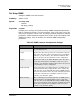
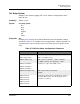
Set Setup SNMP
230 59272-00 C
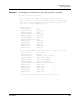
trap [trap_number]
Prompts you in a line-by-line fashion to change SNMP trap parameters for the trap
number given by [trap_number]. [trap_number] can be 1–5. For each parameter,
enter a new value or press the Enter key to accept the current value. To configure
common parameters and trap parameters, omit the Trap keyword. Table 25
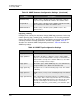
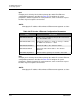
describes the common SNMP configuration parameters. Table 26 describes the
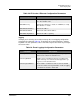
SNMP trap settings.
AuthFailureTrap Enables (True) or disables (False) the generation of traps in
response to trap authentication failures. The default is False.
ProxyEnabled Enables (True) or disables (False) SNMP communication with
other switches in the fabric. The default is True.
SNMPv3Enabled Enables (True) or disables (False) SNMP version 3. The
default is False.
Table 26. SNMP Trap Configuration Settings
Parameter Description
Trap[1–5]Enabled Enables (True) or disables (False) the SNMP trap.
Trap[1–5]Address Workstation IP address or DNS host name to which SNMP
traps are sent. The default address for trap 1 is 10.0.0.254. The
default address for traps 2–5 is 0.0.0.0. Addresses, other than
0.0.0.0, for all traps must be unique.
Trap[1–5]Port Workstation port to which SNMP traps are sent. Valid worksta-
tion port numbers are 1–65535. The default is 162.
Trap[1–5]Severity Severity level to use when monitoring trap events. The default
is Warning.
Trap[1–5]Version SNMP version (1 or 2) to use in formatting the trap. The default
is 2.
Trap[1–5]Community Trap community password that authorizes an SNMP agent to
receive traps. This is a write-only field. The value on the Switch
Module and the SNMP management server must be the same.
The trap community password can be up to 32 characters
excluding #, semicolon (;), and comma (,). The default is “pub-
lic”.
Table 25. SNMP Common Configuration Settings (Continued)
Entry Description