
H3C LSW1FC4P0 Interface Card for S5820X-28C Ethernet Switches Command Line Interface Guide Firmware Version 9.0.7


Command Reference
Set Setup Services
59272-00 C 227
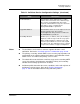
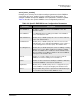
SSLEnabled Enables (True) or disables (False) secure SSL connections
for management applications including QuickTools and
SMI-S. The default is False.
To enable secure SSL connections, you must first syn-
chronize the date and time on the Switch Module and
workstation.
This service must be enabled to authenticate users
through a RADIUS server.
Enabling SSL automatically creates a security certifi-
cate on the Switch Module.
To disable SSL when using a user authentication
RADIUS server, the RADIUS server authentication
order must be local.
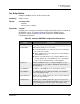
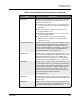
EmbeddedGUIEnabled Enables (True) or disables (False) the QuickTools embed-
ded management application. QuickTools enables you to
point at a Switch Module with an internet browser and
manage the Switch Module. This parameter is the master
control for the Set Setup System command parameter,
EmbeddedGUIEnabled. The default is True.
SNMPEnabled Enables (True) or disables (False) the management of the
Switch Module through third-party applications that use the
Simple Network Management Protocol (SNMP). This
parameter is the master control for the Set Setup SNMP
command parameter, SNMPEnabled. The default is True.
NTPEnabled Enables (True) or disables (False) the Network Time Proto-
col (NTP) which allows the synchronizing of Switch Module
and workstation dates and times with an NTP server. This
helps to prevent invalid SSL certificates and timestamp
confusion in the event log. The default is False. This
parameter is the master control for the Set Setup System
command parameter, NTPClientEnabled.
The default is False.
CIMEnabled Enables (True) or disables (False) the management of the
switch through third-party applications that use SMI-S. The
default is True.
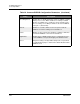
FTPEnabled Enables (True) or disables (False) the File Transfer Proto-
col (FTP) for transferring files rapidly between the worksta-
tion and the Switch Module. The default is True.
Table 24. Switch Module Services Settings (Continued)
Entry Description