
H3C LSW1FC4P0 Interface Card for S5820X-28C Ethernet Switches Command Line Interface Guide Firmware Version 9.0.7


Command Reference
Set Setup Radius
59272-00 C 221
Set Setup Radius
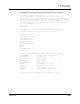
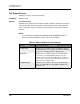
Configures RADIUS servers on the Switch Module.
Authority Admin session
Syntax set setup radius
common
server [server_number]
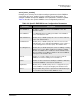
Keywords common
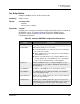
Prompts you in a line-by-line fashion to configure parameters that are common to
all RADIUS servers. To configure common and specific RADIUS server
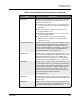
parameters, omit the keyword. Table 22 describes the common RADIUS
configuration parameters.
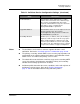
Table 22. Common RADIUS Configuration Parameters
Entry Description
DeviceAuthOrder
UserAuthOrder Authenticator priority for user accounts:
Local: Authenticate users using only the local security data-
base. This is the default.
Radius: Authenticate users using only the security database
on the RADIUS server.
RadiusLocal: Authenticate users using the RADIUS server
security database first. If the RADIUS server is unavailable,
then use the local Switch Module security database.
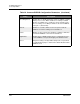
TotalServers Number of RADIUS servers to configure during this session.
Setting TotalServers to 0 disables all RADIUS authentication.
The default is 0.
ServerIPAddress IP address of the RADIUS server. The default is 10.0.0.1.
ServerUDPPort User Datagram Protocol (UDP) port number on the RADIUS
server. The default is 1812.
DeviceAuthServer Enable (True) or disable (False) this server for device authenti-
cation. The default is False.
UserAuthServer Enable (True) or disable (False) this server for user account
authentication. A user authentication RADIUS server requires a
secure management connection (SSL). The default is True.