
H3C LSW1FC4P0 Interface Card for S5820X-28C Ethernet Switches Command Line Interface Guide Firmware Version 9.0.7


Command Reference
Set Config Port
202 59272-00 C
Set Config Port
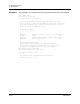
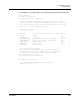
Sets the port configuration parameters for one or more ports. The changes you
make with this command are not retained when you reset or power cycle the
Switch Module unless you save them using the Config Save command.
Authority Admin session and a Config Edit session
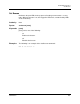
Syntax set config port [port_number]
Keywords port [port_number]
Initiates an edit session in which to change configuration parameters for the port
number given by [port_number]. [port_number] can be 0–3 (external) and 4–7
(internal). If you omit [port_number], the system begins with port 0 and proceeds
in order through the last port. For each parameter, enter a new value or press the
Enter key to accept the current value shown in brackets. Enter “q” to end the
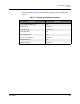
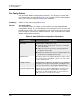
configuration for one port, or “qq” to end the configuration for all ports. Table 18
describes the port configuration parameters.
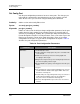
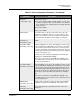
Table 18. Port Configuration Parameters
Parameter Description
AdminState Port administrative state:
Online: Activates and prepares the port to send data. This
is the default.
Offline: Prevents the port from receiving signal and
accepting a device login.
Diagnostics: Prepares the port for testing and prevents the
port from accepting a device login.
Down: Disables the port by removing power from the port
lasers.
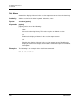
PortType Port types:
TF (external ports only): Transparent Fabric port connects
to Fibre Channel switches that support NPIV. This is the
default for external ports.
TH (internal ports only): Transparent Host port connects to
a Fibre Channel adapter. TH_Ports are mapped to
TF_Ports. This is the default for internal ports.
PT: Pass-through Ethernet port connects to a local area
network