
H3C LSW1FC4P0 Interface Card for S5820X-28C Ethernet Switches Command Line Interface Guide Firmware Version 9.0.7


Command Line Interface Usage
Downloading and Uploading Files
59272-00 C 9
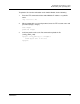
To upload a file from the workstation to the Switch Module, do the following
1. Enter the FTP command and the Switch Module IP address or symbolic
name.
>ftp 192.168.70.129
2. When prompted for a user and password, enter the FTP account name and
password (images, images).
user:images
password: images
3. Set binary mode and use the Put command to upload the file
(config_switch_169).
ftp>put config_switch_169 configdata
xxxxx bytes sent in xx secs.
ftp>quit