
H3C LSW1FC4P0 Interface Card for S5820X-28C Ethernet Switches Command Line Interface Guide Firmware Version 9.0.7



Command Line Interface Usage
Creating a Support File
59272-00 C 7
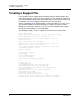
If your workstation does not have an FTP server, enter the Create Support
command to create the support file, and use FTP to download the support file
from the Switch Module to your workstation as shown in the following example:
H3C #> create support
Log Msg:[Creating the support file - this will take several seconds]
FTP the dump support file to another machine? (y/n): n
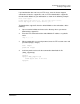
To download the support file from the Switch Module to the workstation, do the
following:
1. Open a terminal window and move to the directory where you want to
download the support file.
2. Enter the FTP command and the Switch Module IP address or symbolic
name.
>ftp 10.0.0.1
3. When prompted for a user and password, enter the FTP account name and
password (images, images).
user: images
password: images
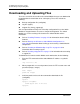
4. Set binary mode and use the Get command to download the file
(dump_support.tgz).
ftp>bin
ftp>get dump_support.tgz
xxxxx bytes sent in xx secs.
ftp>quit