
H3C LSW1FC4P0 Interface Card for S5820X-28C Ethernet Switches Command Line Interface Guide Firmware Version 9.0.7



Command Line Interface Usage
Creating a Support File
6 59272-00 C
Creating a Support File
If you contact technical support about a problem with your Switch Module, they
may request that you create and send a support file. This support file contains all
of the Switch Module configuration information which can be helpful in diagnosing
the problem. The Create Support command creates the support file
(dump_support.tgz) on the Switch Module. If your workstation has an FTP server,
you can proceed with the command prompts to send the file from the Switch
Module to a remote host. Otherwise, you can use FTP to download the support
file from the Switch Module to your workstation.
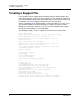
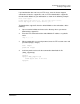
The following example creates a support file and sends it to a remote host.
H3C #> create support
Log Msg:[Creating the support file - this will take several seconds]
FTP the dump support file to another machine? (y/n): y
Enter IP Address or host name of remote computer: 10.20.33.130
Login name: johndoe
Enter remote directory name: bin/support
Would you like to continue downloading support file? (y/n) [n]: y
Connected to 10.20.33.130 (10.20.33.130).
220 localhost.localdomain FTP server (Version wu-2.6.1-18) ready.
331 Password required for johndoe.
Password: xxxxxxx
230 User johndoe logged in.
cd bin/support
250 CWD command successful.
lcd /itasca/conf/images
Local directory now /itasca/conf/images
bin
200 Type set to I.
put dump_support.tgz
local: dump_support.tgz remote: dump_support.tgz
227 Entering Passive Mode (10,20,33,130,232,133)
150 Opening BINARY mode data connection for dump_support.tgz.
226 Transfer complete.
43430 bytes sent in 0.292 secs (1.5e+02 Kbytes/sec)
Remote system type is UNIX.
Using binary mode to transfer files.
221-You have transferred 43430 bytes in 1 files.
221-Total traffic for this session was 43888 bytes in 1 transfers.
221 Thank you for using the FTP service on localhost.localdomain.