
H3C LSW1FC4P0 Interface Card for S5820X-28C Ethernet Switches Command Line Interface Guide Firmware Version 9.0.7


Command Reference
Image
166 59272-00 C
Image
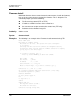
Manages and installs Switch Module firmware.
Authority Admin session
Syntax image
cleanup
fetch [account_name] [ip_address] [file_source] [file_destination]
install
list
tftp [ip_address] [file_source] [file_destination]
unpack [file]
Keywords cleanup
Removes all firmware image files from the
Switch Module. All firmware image files
are removed automatically each time the
Switch Module is reset.
fetch [account_name] [ip_address] [file_source] [file_destination]
Retrieves image file given by [file_source] using FTP and stores it on the
Switch
Module
with the file name given by [file_destination]. The image file is retrieved
from the host IP address given by [Ip_address]. [ip_address] can be an IP
address or a DNS host name. If an account name needs a password to access
the FTP server, the system will prompt you for it.
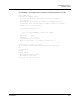
install
Downloads firmware from a remote host to the
Switch Module, installs the firmware,
then resets the
Switch Module to activate the firmware. This is disruptive. The
command prompts you for the following:
File transfer protocol (FTP or TFTP)
IP address or DNS host name of the remote host
An account name and password on the remote host (FTP only)
Pathname for the firmware image file
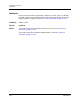
list
Displays the list of image files that reside on the
Switch Module.
tftp [ip_address] [file_source] [file_destination]
Retrieves image file given by [file_source] using TFTP and stores it on the
Switch
Module
with the file name given by [file_destination]. The image file is retrieved
from the host IP address given by [Ip_address]. [ip_address] can be an IP
address or a DNS host name.