
H3C LSW1FC4P0 Interface Card for S5820X-28C Ethernet Switches Command Line Interface Guide Firmware Version 9.0.7

Command Reference
Date
152 59272-00 C
Date
Displays or sets the system date and time. To set the date and time the
information string must be provided in this format: MMDDhhmmCCYY. The new
date and time takes effect immediately.
Authority Admin session except to display the date.
Syntax date
[MMDDhhmmCCYY]
Keywords [MMDDhhmmCCYY]
Specifies the date – this requires an Admin session. If you omit
[MMDDhhmmCCYY], the current date is displayed which does not require an
Admin session.
Notes Network Time Protocol (NTP) must be disabled to set the time with the Date
command. Enter the Set Setup System command to disable the
NTPClientEnabled parameter.
When setting the date and time on a
Switch Module that is enabled for SSL
connections, the
Switch Module time must be within 24 hours of the workstation
time. Otherwise, the connection will fail.
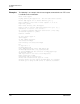
Examples The following is an example of the Date command:
H3C #> date
Mon Apr 07 07:51:24 200x