
H3C LSW1FC4P0 Interface Card for S5820X-28C Ethernet Switches Command Line Interface Guide Firmware Version 9.0.7

Call Home Configuration
Testing a Call Home Profile
59272-00 C 123
Testing a Call Home Profile
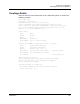
Enter the Callhome Test Profile command to test a Call Home profile as shown in
the following example. This command generates a test message and routes it to
the email recipients specified in the profile.
H3C #> admin start
H3C (admin) #> callhome test profile group4
A callhome profile test has been started.
A notification with the test result will appear
on the screen when the test has completed.
H3C (admin) #>
Test for Callhome Profile group4 Passed.
Changing SMTP Servers
The Call Home service configuration enables you to specify a primary and a
secondary SMTP server to which the switch connects. The active server is the
server that receives messages from the switch. By default, the primary SMTP
server is the active server. Should the active server lose connection, control
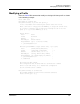
passes automatically to the other server. You can explicitly change the active
server by entering the Callhome Changeover command as shown in the following
example:
H3C #> admin start
H3C #> callhome edit
H3C #> (admin-callhome) #> callhome changeover
The currently active CallHome SMTP server will change. Please confirm (y/n): [n] y
Though the active server status changes, the primary SMTP server remains the
primary, and the secondary SMTP server remains the secondary.
Clearing the Call Home Message Queue
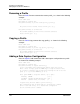
Enter the Callhome Queue Clear command to clear email messages from the Call
Home message queue as shown in the following example:
H3C #> admin start
H3C (admin) #> callhome queue clear
The callhome queue will be cleared. Please confirm (y/n): [n] y
Refer to the Callhome Queue Stats command to display the contents of the Call
Home message queue.