
H3C LSW1FC4P0 Interface Card for S5820X-28C Ethernet Switches Command Line Interface Guide Firmware Version 9.0.7

Call Home Configuration
Managing the Call Home Database
116 59272-00 C
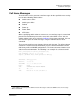
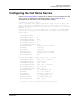
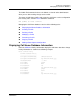
Enter the Show Setup Callhome command to display the Call Home service
configuration as shown in the following example.
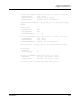
H3C #> show setup callhome
Callhome Information
--------------------
PrimarySMTPServerAddr 0.0.0.0
PrimarySMTPServerPort 25
PrimarySMTPServerEnabled False
SecondarySMTPServerAddr 0.0.0.0
SecondarySMTPServerPort 25
SecondarySMTPServerEnabled False
ContactEmailAddress nobody@localhost.localdomain
PhoneNumber <undefined>
StreetAddress <undefined>
FromEmailAddress nobody@localhost.localdomain
ReplyToEmailAddress nobody@localhost.localdomain
ThrottleDupsEnabled True
+ indicates active SMTP server
Managing the Call Home Database
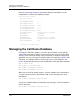
To modify the Call Home database, you must open an Admin session with the
Admin Start command. An Admin session prevents other accounts from making
changes at the same time through Telnet, QuickTools, or another management
application. You must also open a Callhome Edit session with the Callhome Edit
command. The Callhome Edit session provides access to the Callhome and
Profile commands with which you make modifications to the Call Home database.
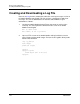
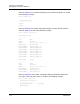
H3C #> admin start
H3C (admin) #> callhome edit
H3C (admin-callhome)#> callhome . . .
H3C (admin-callhome)#> profile . . .
When you are finished making changes, enter the Callhome Save command to
save the changes and close the Callhome Edit session. Changes take effect
immediately.
H3C (admin-callhome)#> callhome save
To close the Callhome Edit session without saving changes, enter the Callhome
Cancel command.
H3C (admin-callhome)#> callhome cancel