
H3C LSW1FC4P0 Interface Card for S5820X-28C Ethernet Switches Command Line Interface Guide Firmware Version 9.0.7

Call Home Configuration
Call Home Concepts
59272-00 C 113
Call Home Messages
The Call Home service generates email messages for the specified event severity
level and the following switch actions:
Switch comes online
Switch goes offline
Reboot
Power up
Power down
1
SFP failure
When a qualifying switch action or event occurs, an email message is created and
placed in the Call Home queue to be sent to the active SMTP server. You can
monitor activity in the queue using the Callhome Queue Stats command. You can
also clear the queue of email messages using the Callhome Queue Clear
command.
There are two email message formats: full text and short text. The full-text format
contains the switch and event information, plus the contact information from the
Call Home profile and SNMP configurations. The short-text format contains basic
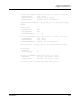
switch and event information. The following is an example of a short-text email:
From: john.doe@h3c.com [mailto:john.doe@h3c.com]
Sent: Wednesday, July 25, 2007 5:03 PM
Subject: [CallHome: Test] Alarm generated on Switch_8
SwitchName: Switch_8_83.215
SwitchIP: 10.20.30.40
SwitchWWN: 10:00:00:c0:dd:0c:66:f2
Level: Alarm
Text: CALLHOME TEST PROFILE MESSAGE
ID: 8B00.0002
Time: Wed Jul 25 17:02:40.343 CDT 2007
1
If the switch is forced to power-down before the message is sent to the SMTP server, no message
will be transmitted.