
H3C LSW1FC4P0 Interface Card for S5820X-28C Ethernet Switches Command Line Interface Guide Firmware Version 9.0.7

Event Log Configuration
Starting and Stopping Event Logging
104 59272-00 C
Starting and Stopping Event Logging
Enter the Set Log Stop command to stop recording event messages in the Switch
Module Log as shown in the following example:
H3C (admin) #> set log stop
Enter the Set Log Start command to start recording event message in the Switch
Module log as shown in the following example:
H3C (admin) #> set log start
Displaying the Event Log
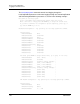
Enter the Show Log command to display the event log. Each message has the
following format:
[ordinal][time_stamp][severity][message_ID][source][message_text]
[ordinal]—A number assigned to each message in sequence since the
last time the alarm history was cleared.
[time_stamp]—The time the alarm was issued in the format
day month hh:mm:ss.ms UTC yyyy. This time stamp comes from the Switch
Module for events that originate with the switch.
[severity]—The event severity: A—Alarm, C—Critical, W—Warning,
I–Informative.
[message_ID]—A number that identifies the message using the following
format: category.message_number
[source]—The program module or application that generated the event.
Alarms do not include the source.