
H3C LSW1FC4P0 Interface Card for S5820X-28C Ethernet Switches Command Line Interface Guide Firmware Version 9.0.7

RADIUS Server Configuration
Configuring a RADIUS Server on the Switch
59272-00 C 101
Configuring a RADIUS Server on the Switch
Enter the Set Setup Radius command to configure a RADIUS server on the
Switch Module. There are two groups of RADIUS configuration parameters. One
group of parameters is common to all RADIUS server configurations. The second
group is server specific. You can configure both groups of parameters for all
RADIUS servers, or you can configure the common and server-specific
parameters separately. Refer to Table 22 for a description of the RADIUS server
configuration parameters.
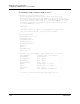
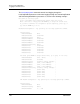
The following example configures the common RADIUS server configuration
parameters:
H3C (admin) #> set setup radius common
A list of attributes with formatting and current values will follow.
Enter a new value or simply press the ENTER key to accept the current value.
If you wish to terminate this process before reaching the end of the attributes
for the server being processed, press 'q' or 'Q' and the ENTER key to do so.
If you wish to terminate the configuration process completely, press 'qq' or
'QQ' and the ENTER key to so do.
PLEASE NOTE:
-----------
* SSL must be enabled in order to configure RADIUS User Authentication
SSL can be enabled using the 'set setup services' command.
Current Values:
DeviceAuthOrder Local
UserAuthOrder Local
TotalServers 1
New Value (press ENTER to not specify value, 'q' to quit):
DeviceAuthOrder 1=Local, 2=Radius, 3=RadiusLocal :
UserAuthOrder 1=Local, 2=Radius, 3=RadiusLocal :
TotalServers decimal value, 0-5 :
Do you want to save and activate this radius setup? (y/n): [n]