
H3C LSW1FC4P0 Interface Card for S5820X-28C Ethernet Switches Command Line Interface Guide Firmware Version 9.0.7



Port Configuration
Testing a Port
59272-00 C 93
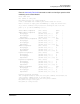
The following example performs an offline test:
H3C #> admin start
H3C (admin) #> set port 1 state diagnostics
H3C (admin) #> test port 1 offline internal
A list of attributes with formatting and current values will follow. Enter a new
value or simply press the ENTER key to accept the default value. If you wish to
terminate this process before reaching the end of the list press 'q' or 'Q' and
the ENTER key to do so.
LoopCount (decimal value, 1-4294967295) [100 ]
FrameSize (decimal value, 40-2148) [256 ]
DataPattern (32-bit hex value or 'Default') [Default ]
StopOnError (True / False) [True ]
LoopForever (True / False) [False ]
Do you want to start the test? (y/n) [n] y
The test has been started.
A notification with the test result(s) will appear
on the screen when the test has completed.
H3C (admin) #>
Test for port 1 Passed.
When the test is complete, remember to place the port back online.
H3C (admin) #> set port 1 state online
When the test is complete, remember to place the port back online.
H3C (admin) #> set port 1 state online
Display Port Test Results
You can display the test status while the test is in progress by entering the
Test Status Port command as shown in the following example:
H3C (admin) #> test status port 1
Port Test Test Loop Test
Num Port Type Status Count Failures
---- -------- ---- ------ ----- --------
1 1 Offline Internal Passed 12 0
Cancel a Port Test
To cancel a port test that is in progress, enter the Test Cancel Port command.