
H3C LSW1FC4P0 Interface Card for S5820X-28C Ethernet Switches Command Line Interface Guide Firmware Version 9.0.7



Port Configuration
Resetting a Port
90 59272-00 C
Resetting a Port
Enter the Reset Port command to reinitialize one or more ports and to discard any
temporary changes that have been made to the administrative state or link speed.
The following example reinitializes port 0:
H3C #> admin start
H3C (admin) #> reset port 0
Configuring Port Threshold Alarms
The Switch Module can monitor a set of port errors and generates alarms based
on user-defined sample windows and thresholds. These port errors include the
following:
Cyclic Redundancy Check (CRC) errors
Decode errors
ISL connection count
Device login errors
Device logout errors
Loss-of-signal errors
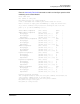
You make changes to the port threshold alarms by modifying the Switch Module
configuration as described in “Modify a Switch Module Configuration” on
page 4-66. Refer to Table 20 for a description of the port alarm threshold
parameters.
The Switch Module will down a port if an alarm condition is not cleared within
three consecutive sampling windows (by default 30 seconds). Reset the port to
bring it back online. An alarm is cleared when the threshold monitoring detects
that the error rate has fallen below the falling trigger.