
HP Networking guide to hardening Comware-based devices
Table Of Contents
- Introduction
- Management plane
- General management plane hardening
- Limiting access to the network with infrastructure ACLs
- Securing interactive management sessions
- Fortifying Simple Network Management Protocol
- Logging best practices
- HP Comware software configuration management
- Control plane
- General control plane hardening
- Limiting the CPU impact of control plane traffic
- Securing BGP
- Securing Interior Gateway Protocols
- Securing Virtual Router Redundancy Protocol
- Data plane
- General data plane hardening
- Filtering transit traffic with Transit ACLs
- Anti-spoofing protections
- Limiting the CPU impact of data plane traffic
- Traffic identification and traceback
- Access control with VLAN QoS policy and port access control lists
- Using private VLANs
- Port isolation
10
Authentication, authorization, and accounting with HWTACACS
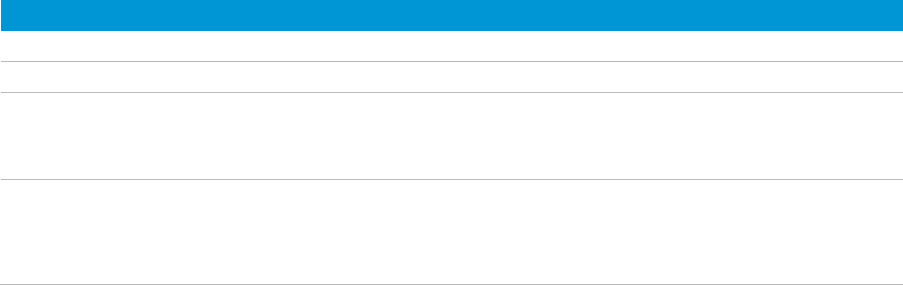
HWTACACS and RADIUS both provide authentication, authorization, and accounting services. They have many common
features in implementing AAA, such as using the client/server model, using shared keys for user information security,
and having good flexibility and extensibility. They also have differences, which are listed below.
HWTACACS RADIUS
Uses TCP, providing more reliable networking transmission. Uses UDP, providing higher transport efficiency.
Encrypts the entire packet except for the HWTACACS header. Encrypts only the user password field in an authentication packet.
Protocol packets are complicated, and authorization is
independent of authentication. Authentication and
authorization can be deployed on different HWTACACS
servers.
Protocol packets are simple, and authorization is combined with
authentication.
Supports authorization of configuration commands. Which
commands a user can use depends on both the user level
and AAA authorization. A user can use only commands that
are not only of, or lower than, their user level but also
authorized by the HWTACACS server.
Does not support authorization of configuration commands.
Which commands a user can use depends on the user’s level. A
user can use all the commands of, or lower than, their user level.
The following gives an example HWTACACS AAA configuration:
#
hwtacacs scheme tacacs
primary authentication 192.168.0.1
secondary authentication 192.168.0.2
primary authorization 192.168.0.1
secondary authorization 192.168.0.2
primary accounting 192.168.0.1
secondary accounting 192.168.0.2
key authentication HP
key authorization HP
key accounting HP
user-name-format without-domain
#
Authentication and authorization with LDAP
Based on TCP/IP, Lightweight Directory Access Protocol (LDAP) is used to provide standard multi-platform directory
service. It is developed on the basis of the X.500 protocol, and improves the read/write interactive access, and browse
and search functions of X.500. It is suitable for storing data that is not often changed.
LDAP is typically used to store user information in a system. For example, the Active Directory Server is used in
Microsoft® Windows® operating systems to store user information and user group information for authentication and
authorization at login.
The following gives an example LDAP configuration:
#
ldap scheme ldap
authentication-server 192.168.0.244
authorization-server 192.168.0.244
login-dn cn=administrator,cn=users,dc=server
login-password simple sys508
user-parameters search-base-dn dc=server
#