
Comware CLI Commands in Provision Software 2013/06
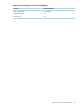

display vrrp interface <interface-type> vrid <virtual routerid>
Related ProVisionComware
show vrrp<interface-type> vrid <virtual routerid>display vrrp interface <interface-type> vrid <virtual
routerid>
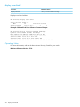
NOTE: This command is not supported on the HP 2920 Series switches.
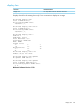
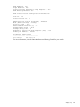
HP Switch# display vrrp interface vlan-interface 4 vrid 1
IPv4 Standby Information:
Run Mode : Standard
Run Method : Virtual MAC
Info: No such standby!
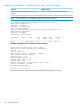
HP-E3500-24-PoE# display vrrp interface vlan-interface 4 vrid 4
IPv4 Standby Information:
Run Mode : Standard
Run Method : Virtual MAC
Interface VRID State Run Adver Auth Virtual
Pri Timer Type IP
-------------------------------------------------------------
Vlan4 4 Initialize 144 1 None 14.4.1.1
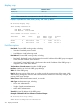
Example of Related ProVision Software Command Output.
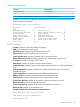
HP Switch# show vrrp vlan 2 vrid 1 config
VRRP Virtual Router Configuration Information
Vlan ID : 2
Virtual Router ID : 1
Administrative Status [Disabled] : Enabled
Mode [Uninitialized] : Backup
Priority [100] : 150
Advertisement Interval [1] : 1
Preempt Mode [True] : True
Preempt delay time : 0
Respond to Virtual IP Ping Requests [Yes] : Yes
Primary IP Address : Lowest
IP Address Subnet Mask
--------------- ---------------
10.0.202.87 255.255.0.0
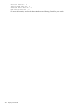
For more information, see the latest Multicast and Routing Guide for your switch.
316 Display Commands