
HP PCIe IO Accelerator for ProLiant Servers


Hardware Installation 8
Hardware Installation
Installation Instructions
CAUTION: Electrostatic discharge (ESD) can damage electronic components. Be sure
that you are properly grounded before beginning any hardware installation
procedure.
If you are in
stalling the PCIe IO Accelerator in a low-profile system, you need to use the half-height
bracket. Please refer to the Half-Height Bracket Installation
section for details.
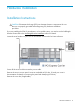
Locate the serial number on your PCIe IO Accelerator and record it for future reference.
Power off the server and disconnect the power cable.
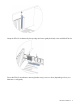
Remove the server’s access panel. Locate an available x4 PCIe slot. (Consult your server’s
documentation for details on removing the panel and identifying PCIe slots.)
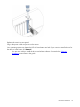
Remove the cover slot (if applicable).