
HP PCIe IO Accelerator for ProLiant Servers

Appendix D: SNMP Test Mode and MIB Support 40
Appendix D: SNMP Test Mode and MIB
Support
Introduction
This document explains how you can set up a test mode with your PCIe IO Accelerator’s
Windows SNMP agent. This enables you to set test values in a indows registry and force
SNMP traps without having to create the actual conditions on the device.
For example, you can use the SNMP test mode to change the non-writeable indicator and
generate a trap, or simulate a change to the physical or logical size of the device, etc.
NOTE: To use SNMP Test Mode, you must have installed the SNMP option with your PCIe IO
Accelerator.
Using Test-Mode Registry Values
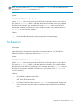
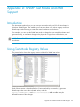
The picture below shows the registry entries included for SNMP test values.
Each of these entries is described below. Entries marked by an asterisk (*) generate
SNMP traps when set to the indicated values, and the
fusionIoDrvMIBCondition and fusionIoDrvInfoStatus MIB variables may be
affected because of the changes.