
HP PCIe IO Accelerator for ProLiant Servers

Appendix B: Manual Installation 30
Appendix B: Manual Installation
The Windows Setup program should install your needed driver and software.
However, if the driver does not install, you can perform a manual install (or upgrade)
using the steps below.
Manual Installation on Windows Server 2003
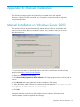
The Windows Driver Wizard automatically detects the new PCIe IO Accelerator and
start to locate its driver after you restart the system. First, Windows asks you to locate
the software driver:
1. If you have not done so, download and run the PCIe IO Accelerator Windows Setup
program from http://www.hp.com/support
.
2. Return to the Update Driver dialog.
3. Click Browse My Computer for driver software. The Setup program asks you for a path to
search.
4. Click Browse next to the path field. Windows displays a file dialog.
5. Select the folder with the PCIe IO Accelerator driver (the default is
C:\Program Files\HP
StorageWorks IO Accelerator\1.2.7.1\Drivers
).
6. Click OK.
Windows finds the correct driver and install the device software. When the driver
install completes, Windows displays this message: