
HP PCIe IO Accelerator for ProLiant Servers

Software Installation 18
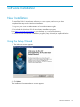
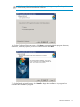
8. On the Completion screen, click Finish to exit the Wizard and launch the IO Accelerator
software.
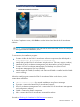
NOTE: If you are prompted to stop and start the Microsoft SNMP service at some point
during the software installation, do so.
To summarize, the installation program:
Creates a folder for the PCIe IO Accelerator software components (the default path is
C:\Program Files\ HP StorageWorks IO Accelerator\).
Installs and load the PCIe IO Accelerator Windows driver. (This may require a reboot.)
Installs the PCIe IO Accelerator Management Tool administrator console (if selected)
Creates a PCIe IO Accelerator Management Tool desktop icon (if the PCIe IO
Accelerator Management Tool was installed)
Installs support for SNMP (if installed, and if Microsoft SNMP is installed and the SNMP
service running)
When the install program creates the PCIe IO Accelerator folder on the device, it also
creates these sub-folders:
<driver version>\Driver—for manual installations using Device Manager
Firmware—contains the latest PCIe IO Accelerator firmware
PCIe IO Accelerator Management Tool—contains the PCIe IO Accelerator management
and configuration software
SNMP—contains the SNMP components
Utils—contains the PCIe IO Accelerator command-line utilities
Proceed to Checking for Outdated or Old Firmware
to continue.