
HP PCIe IO Accelerator for ProLiant Servers User Guide

Utilities 93
Utilities
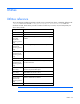
Utilities reference
The IO Accelerator installation packages include various command line utilities, installed by default to the
/usr/bin file for Linux and the C:\Program Files\HP IO Accelerator\Utils folder for
Windows Server®. These utilities provide a number of useful ways to access, test, and manipulate your
device. They include:
Utility Purpose
fio-attach Makes an IO Accelerator available to the OS
fio-beacon Lights the IO Accelerator external LEDs
fio-bugreport
(Linux and
Windows®
operating systems
only)
Prepares a detailed report for use in troubleshooting
problems
fio-config
(Windows®
operating systems
only)
Enables configuration parameters for device operation
fio-detach (Linux
and Windows®
operating systems
only)
Temporarily removes an IO Accelerator from OS access
fio-format Used to perform a low-level format of an IO Accelerator
fio-pci-check (Linux
and Windows®
operating systems
only)
Searches for errors on the PCIe bus tree, specifically for
PCIe IO Accelerators
fio-read-lebmap
(Linux only)
Dumps the current LEB map for an IO Accelerator and
writes the map to standard output.
fio-snmp-agentx
(Linux only)
SNMP sub-agent that implements the SNMP FUSION-
IODRV-MIB for the Fusion-io driver
fio-status Displays information about the device
fio-trim-config
(Windows®
operating systems
only)
Enable or disable the Trim feature
fio-update-iodrive Updates the IO Accelerator firmware
NOTE: All utilities have –h (Help) and –v (Version) options.