
HP PCIe IO Accelerator for ProLiant Servers User Guide


Maintenance 89
Maintenance
Maintenance tools
The IO Accelerator includes both software utilities to maintain the device and external LED indicators to
display its status. You can also install SNMP as a monitoring option.
The following are the most common tasks for maintaining your IO Accelerator. You can also use the IO
Accelerator Management Tool application to perform firmware upgrades. For more information, see HP
IO Accelerator Management Tool (on page 66).
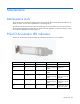
PCIe IO Accelerator LED indicators
The PCIe IO Accelerator includes three LEDs to indicate device activity or error conditions.
Green Yellow Amber Indicates Notes
Off Off Off Power off —
On Off On Power on, driver not
loaded
Load driver.
On Off Off Power on, driver
loaded
—
On Flashing Off Writing (rate
indicates volume of
writes)
Can appear in
combination with the
read LED.
Flashing Off Off Reading (rate
indicates volume of
reads)
Can appear in
combination with the
write LED.
On On On Location beacon Also appears during
a firmware update.