
HP PCIe IO Accelerator for ProLiant Servers User Guide


HP IO Accelerator Management Tool 81
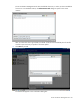
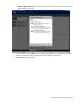
The IO Accelerator Management Tool shows the default directories, so unless you have installed the
firmware in a non-standard location, the Select Firmware File dialog box opens to the correct
location.
After you select a file from a given folder, that folder will be saved as the default place for the file
chooser to open next time you perform a firmware update.
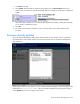
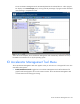
6. Click Next to proceed.
The selected file appears in the confirmation dialog box.