
HP PCIe IO Accelerator for ProLiant Servers User Guide

Windows Server environments 41
4.
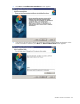
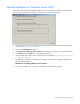
Run the IO Accelerator installation program (Setup Wizard) as explained in "Using the Setup
Wizard (on page 41)."
CAUTION: The installation program does not remove previous versions of the software. If a
previous version is removed after the newest version is installed, the driver does not load after
a restart. If this occurs, run the Repair option in the installation program from Programs and
Features (or Add or Remove Programs) in the Control Panel, and then restart the computer.
NOTE: Screens might appear slightly different (for example, the word "StorageWorks" might
not appear in the name or pathname with version 2.x).
Using the Setup Wizard
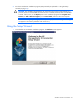
1. Download the IO Accelerator installation program. The Welcome screen appears.