
HP 3PAR Service Processor Software 4.1.x Release Notes (QR482-96666)


6 Service Processor Software 4.1.0 MU2 Release
What’s New in the Service Processor
The SP 4.1.0 Maintenance Update 2 (MU2) release includes the previously released SP 4.1 patches
(P001 and P002) and Maintenance Update 1 (MU1), and it includes the following enhancements:
• After upgrading to SP 4.1 MU2, Service Processors that are configured in Secure Network
Mode (Axeda) will be automatically reconfigured to connect to new servers at HP.
The new servers’ host names and IP addresses are as follows:
◦ Collector Server:
– https://remote3par.houston.hp.com (15.201.225.95)
◦ Remote Support Connectivity Global Access Servers (GAS):
g4t2481g.houston.hp.com (15.201.200.205)–
– g4t2482g.houston.hp.com (15.201.200.206)
– g9t1615g.houston.hp.com (15.240.0.73)
– g9t1616g.houston.hp.com (15.240.0.74)
Before you perform this upgrade, make sure there are no firewall restrictions to these
servers on port 443. Firewall and/or proxy server configuration should be updated to
allow outbound connections from the Service Processor to the new servers.
CAUTION: Failure to confirm firewall settings may result in the loss of the file transfer.
• Starting with SP 4.1 MU2, all newly configured Service Processors (both physical and virtual)
will have a Service Processor ID (SP ID) that is based on the serial number for the HP 3PAR
StoreServ Storage system that is attached to the Service Processor. The SP ID will be 12
characters long and have the following format:
SP000+<seven-digit 3PAR StoreServ serial number>
For example, if the serial number of the StoreServ storage system that is to be attached to the
Service Processor is 1234567, the Service Processor SP ID will be SP0001234567.
Modifications to the Service Processor
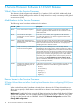
The following issue has been addressed in this release.
DescriptionItemIssue ID
The issue in which the user profile records (including the user profile,
notification settings, site settings, and so on) are not created at first
Rescue file generation is missing DB
sequence type
85542
after you use remote upgrade to upgrade the SP software from version
2.5.x has been resolved. You do not need to use the stated
workaround.
Known Issues with the Service Processor
Better estimate of time required for cage firmware upgrades needed (Issue 86777)
In the “Check storage system hardware configuration” step of the Storage System Setup Wizard,
an amount of time that the upgrade will take to complete is given. This amount of time is only an
estimate. The actual elapsed time may vary depending on the number of devices in your
configuration.
18 Service Processor Software 4.1.0 MU2 Release