
HP 3PAR Recovery Manager Diagnostics Tool for Hyper-V User Guide (QL226-97315, February 2014)





6 Troubleshooting
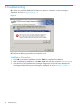
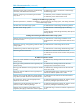
Q1. When you install the RMD tool for RMH on a system in a domain, an error message is
displayed, as shown in Figure 4 (page 14)
Figure 4
A1. Perform the following procedure to resolve the issue.
Installation Procedure
1. Click OK to resume the installation and click Finish to complete the installation.
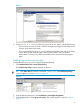
2. After completing the installation, click Start→ Run and enter the command, services.msc.
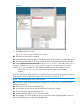
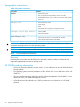
3. Start the service HP 3PAR Recovery Manager Diagnostics Tool for Recovery Manager for
Exchange and the following error message is displayed, as shown in Figure 5 (page 15).
14 Troubleshooting