
Basic Operation Guide 2013/06
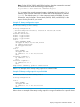
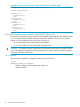
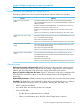

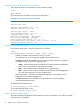
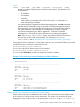

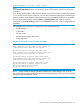

Table Of Contents
- Switch Software
- Contents
- 1 Commands found in the Basic Operation Guide
- 2 Getting started
- 3 Using the Menu Interface
- 4 Using the Command Line Interface (CLI)
- Overview
- Accessing the CLI
- Using the CLI
- Return message types with CLI commands
- CLI interactive commands
- CLI control and editing
- 5 Using the HP WebAgent
- 6 Switch memory and configuration
- Overview
- Configuration file management
- Using the CLI to implement configuration changes
- Creating a custom default configuration
- Using the menu and WebAgent to implement configuration changes configuration file
- Zeroization
- Using Primary and Secondary flash image options
- Multiple configuration files
- Display configuration of selected interface
- Automatic configuration update with DHCP Option 66
- 7 Interface access and system information
- 8 Configuring IP addressing
- Overview
- IP configuration
- Loopback interfaces
- IP Preserve: retaining VLAN-1 IP addressing across configuration file downloads
- Configuring a single source IP address
- 9 Software management
- Downloading switch documentation and software from the web
- Viewing or downloading the software manual set
- Downloading software updates for your switch
- Software signing and verification
- Saving configurations while using the CLI
- Important: Best Practices for software updates
- Updating the switch: overview
- Updating the switch: detailed steps
- Rolling back switch software
- Viewing or transferring alternate configuration files
- Downloading switch documentation and software from the web
- Index

[local-terminal <vt 100 | none | ansi> ]
NOTE:
If the console idle-timeout expires, any outbound Telnet or SSH sessions open on the switch are
terminated.
If you change the Baud Rate or Flow Control settings, you should make the corresponding changes
in your console access device. Otherwise, you may lose connectivity between the switch and your
terminal emulator due to differences between terminal and switch settings for these two parameters.
All console parameter changes except events and inactivity-timer require that you save the
configuration with write memory and then execute boot before the new console configuration will
take effect.
The example below shows how to configure the switch with the following:
• VT100 operation
• 19,200 baud
• No flow control
• 600 second (10 minute) idle timeout
• Critical log events
Example 77 Executing a series of console commands
HP Switch(config)# console terminal vt100
This command will take effect after saving the
configuration and rebooting the system.
HP Switch(config)# console baud-rate 19200
This command will take effect after saving the
configuration and rebooting the system.
HP Switch(config)# console flow-control none
This command will take effect after saving the
configuration and rebooting the system.
HP Switch(config)# console idle-timeout 600
HP Switch(config)# console events critical
HP Switch(config)# write memory
HP Switch(config)# reload
NOTE: Switch models supporting redundant management, console settings, such as mode,
flow-control and baud-rate, are the same on both management modules. There cannot be individual
settings for each management module.
Interface access: console/serial link, web, and inbound telnet 99