
Basic Operation Guide 2013/06



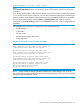

Table Of Contents
- Switch Software
- Contents
- 1 Commands found in the Basic Operation Guide
- 2 Getting started
- 3 Using the Menu Interface
- 4 Using the Command Line Interface (CLI)
- Overview
- Accessing the CLI
- Using the CLI
- Return message types with CLI commands
- CLI interactive commands
- CLI control and editing
- 5 Using the HP WebAgent
- 6 Switch memory and configuration
- Overview
- Configuration file management
- Using the CLI to implement configuration changes
- Creating a custom default configuration
- Using the menu and WebAgent to implement configuration changes configuration file
- Zeroization
- Using Primary and Secondary flash image options
- Multiple configuration files
- Display configuration of selected interface
- Automatic configuration update with DHCP Option 66
- 7 Interface access and system information
- 8 Configuring IP addressing
- Overview
- IP configuration
- Loopback interfaces
- IP Preserve: retaining VLAN-1 IP addressing across configuration file downloads
- Configuring a single source IP address
- 9 Software management
- Downloading switch documentation and software from the web
- Viewing or downloading the software manual set
- Downloading software updates for your switch
- Software signing and verification
- Saving configurations while using the CLI
- Important: Best Practices for software updates
- Updating the switch: overview
- Updating the switch: detailed steps
- Rolling back switch software
- Viewing or transferring alternate configuration files
- Downloading switch documentation and software from the web
- Index
CLI command and then configuring the telnet client with those dimensions. The new window
dimensions are lost after that telnet session ends.
When the telnet connection is established with an HP switch, either the switch or the telnet client
needs to initiate the inquiry about the availability of NAWS. If NAWS is available, you can resize
the window by dragging the corner of the window to the desired size. The telnet software uses
NAWS to tell the switch what the new window dimensions are. If the switch supports the requested
window dimensions, it uses them for all future interactions. If the switch does not support those
window dimensions, it refuses them and the telnet client requests an alternate set of window
dimensions. The negotiation continues until the telnet client and the switch agree on the window
dimensions.
The switch currently responds to a request from the remote telnet client to negotiate window size.
However, some telnet clients do not request to negotiate window size unless the switch’s telnet
server suggests that NAWS is available.
This feature allows window size negotiation to occur with telnet clients that support NAWS but do
not try to use it unless it is suggested by the switch’s telnet server. The switch’s telnet server will
suggest to the telnet client that NAWS is available.
Reconfigure WebAgent access
In the default configuration, web browser access is enabled.
Syntax:
[no] web-management [listen | <oobm | data | both> ]
Use the no version of the command to disable inbound HTTP access.
The listen parameter is available only on switches that have a separate out-of-band
management port. Values for this parameter are:
• oobm— inbound HTTP access is enabled only on the out-of-band management
port.
• data— inbound HTTP access is enabled only on the data ports.
• both— inbound HTTP access is enabled on both the out-of-band management
port and on the data ports. This is the default value.
Refer to Appendix I, "Network Out-of-Band Management" in this guide for more
information on out-of-band management.
The listen parameter is not available on switches that do not have a separate
out-of-band management port.
To disable WebAgent access:
HP Switch(config)# no web-management
To re-enable WebAgent access:
HP Switch(config)# web-management
Reconfigure the console/serial link settings
Syntax:
console
[terminal <vt100 | ansi | none> ]
[screen-refresh <1 | 3 | 5 | 10 | 20 | 30 | 45 | 60> ]
[baud-rate <speed-sense | 1200 | 2400 | 4800 | 9600 | 19200 | 38400 |
57600 | 1155200> ]
[flow-control <xon/xoff | none> ]
[idle-timeout <0-7200>]
[events [<none] | all | not-info | critical | debug> ]
98 Interface access and system information