
Basic Operation Guide 2013/06
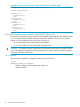
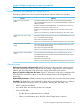



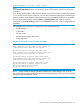

Table Of Contents
- Switch Software
- Contents
- 1 Commands found in the Basic Operation Guide
- 2 Getting started
- 3 Using the Menu Interface
- 4 Using the Command Line Interface (CLI)
- Overview
- Accessing the CLI
- Using the CLI
- Return message types with CLI commands
- CLI interactive commands
- CLI control and editing
- 5 Using the HP WebAgent
- 6 Switch memory and configuration
- Overview
- Configuration file management
- Using the CLI to implement configuration changes
- Creating a custom default configuration
- Using the menu and WebAgent to implement configuration changes configuration file
- Zeroization
- Using Primary and Secondary flash image options
- Multiple configuration files
- Display configuration of selected interface
- Automatic configuration update with DHCP Option 66
- 7 Interface access and system information
- 8 Configuring IP addressing
- Overview
- IP configuration
- Loopback interfaces
- IP Preserve: retaining VLAN-1 IP addressing across configuration file downloads
- Configuring a single source IP address
- 9 Software management
- Downloading switch documentation and software from the web
- Viewing or downloading the software manual set
- Downloading software updates for your switch
- Software signing and verification
- Saving configurations while using the CLI
- Important: Best Practices for software updates
- Updating the switch: overview
- Updating the switch: detailed steps
- Rolling back switch software
- Viewing or transferring alternate configuration files
- Downloading switch documentation and software from the web
- Index

Example 74 Enabling configuration file update using Option 66
HP Switch(config)# dhcp config-file-update
Possible scenarios for updating the configuration file
The following table shows various network configurations and how Option 66 is handled.
BehaviorScenario
Single Server serving Multiple
VLANs
• Each DHCP-enabled VLAN interface initiates DHCPDISCOVER message,
receives DHCPOFFER from the server, and send DHCPREQUEST to obtain the
offered parameters.
• If multiple interfaces send DHCPREQUESTs, it’s possible that more than one
DHCPACK is returned with a valid Option 66.
• Evaluating and updating the configuration file occurs only on the primary
VLAN.
• Option 66 is ignored by any interfaces not belonging to the primary VLAN.
Multiple Servers serving a Single
VLAN
• Each DHCP-enabled VLAN interface initiates one DHCPDISCOVER and receives
one or more DHCPOFFER messages.
• Each interface accepts the best offer.
• Option 66 is processed only for the interface belonging to the primary VLAN.
Multiple Servers serving Multiple
VLANs
• Each DHSP-enabled VLAN interface initiates DHCPDISCOVER and receives
one or more DHCPOFFER messages.
• Each interface accepts the best offer.
• Option 66 is processed only for the interface belonging to the primary VLAN.
Multi-homed Server serving Multiple
VLANs
• The switch perceives the multi-homed server as multiple separate servers.
• Each DHCP-enabled VLAN interface initiates DHCPDISCOVER and receives
one DHCPOFFER message.
• Each interface accepts the offer.
• Option 66 is processed only for the interface belonging to the primary VLAN.
Operating notes
Replacing the existing configuration file: After the DHCP client downloads the configuration file,
the switch compares the contents of that file with the existing configuration file. If the content is
different, the new configuration file replaces the existing file and the switch reboots.
Option 67 and the configuration file name: Option 67 includes the name of the configuration file.
If the DHCPACK contains this option, it overrides the default name for the configuration file
(switch.cfg)
Global DHCP parameters: Global parameters are processed only if received on the primary VLAN.
Best Offer: The "Best Offer" is the best DHCP or BootP offer sent by the DHCP server in response
to the DHCPREQUEST sent by the switch. The criteria for selecting the "Best Offer" are:
• DHCP is preferred over BootP
• If two BootP offers are received, the first one is selected
• For two DHCP offers:
The offer from an authoritative server is selected◦
◦ If there is no authoritative server, the offer with the longest lease is selected
Automatic configuration update with DHCP Option 66 93