
Basic Operation Guide 2013/06
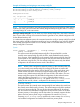

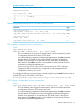

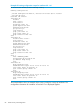
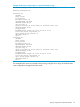
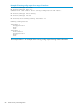

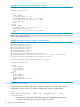
Table Of Contents
- Switch Software
- Contents
- 1 Commands found in the Basic Operation Guide
- 2 Getting started
- 3 Using the Menu Interface
- 4 Using the Command Line Interface (CLI)
- Overview
- Accessing the CLI
- Using the CLI
- Return message types with CLI commands
- CLI interactive commands
- CLI control and editing
- 5 Using the HP WebAgent
- 6 Switch memory and configuration
- Overview
- Configuration file management
- Using the CLI to implement configuration changes
- Creating a custom default configuration
- Using the menu and WebAgent to implement configuration changes configuration file
- Zeroization
- Using Primary and Secondary flash image options
- Multiple configuration files
- Display configuration of selected interface
- Automatic configuration update with DHCP Option 66
- 7 Interface access and system information
- 8 Configuring IP addressing
- Overview
- IP configuration
- Loopback interfaces
- IP Preserve: retaining VLAN-1 IP addressing across configuration file downloads
- Configuring a single source IP address
- 9 Software management
- Downloading switch documentation and software from the web
- Viewing or downloading the software manual set
- Downloading software updates for your switch
- Software signing and verification
- Saving configurations while using the CLI
- Important: Best Practices for software updates
- Updating the switch: overview
- Updating the switch: detailed steps
- Rolling back switch software
- Viewing or transferring alternate configuration files
- Downloading switch documentation and software from the web
- Index

Example 66 Running config output for a specified interface range
HP Switch(config)# show running-config interface A2-A3
Running configuration:
interface A2
disable
name "test1"
flow-control
broadcast-limit 80
speed-duplex 100-full
unknown-vlans block
qos priority 4
gvrp join-timer 30 leave-timer 60 leaveall-timer 700
dhcp-snooping trust
lacp passive
bandwidth-min output 20 10 10 10 20 10 10 10
rate-limit bcast in percent 75
ipv6 access-group "check" in
untagged vlan 1
exit
interface A3
disable
name "test1"
flow-control
broadcast-limit 80
speed-duplex 100-full
unknown-vlans block
qos priority 4
gvrp join-timer 30 leave-timer 60 leaveall-timer 700
dhcp-snooping trust
lacp passive
bandwidth-min output 20 10 10 10 20 10 10 10
rate-limit bcast in percent 75
ipv6 access-group "check" in
untagged vlan 1
exit
The example below shows an example of the running config file for a range of interfaces after
some configuration changes have been made.
Display configuration of selected interface 87