
Basic Operation Guide 2013/06
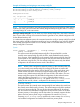

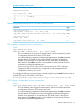


Table Of Contents
- Switch Software
- Contents
- 1 Commands found in the Basic Operation Guide
- 2 Getting started
- 3 Using the Menu Interface
- 4 Using the Command Line Interface (CLI)
- Overview
- Accessing the CLI
- Using the CLI
- Return message types with CLI commands
- CLI interactive commands
- CLI control and editing
- 5 Using the HP WebAgent
- 6 Switch memory and configuration
- Overview
- Configuration file management
- Using the CLI to implement configuration changes
- Creating a custom default configuration
- Using the menu and WebAgent to implement configuration changes configuration file
- Zeroization
- Using Primary and Secondary flash image options
- Multiple configuration files
- Display configuration of selected interface
- Automatic configuration update with DHCP Option 66
- 7 Interface access and system information
- 8 Configuring IP addressing
- Overview
- IP configuration
- Loopback interfaces
- IP Preserve: retaining VLAN-1 IP addressing across configuration file downloads
- Configuring a single source IP address
- 9 Software management
- Downloading switch documentation and software from the web
- Viewing or downloading the software manual set
- Downloading software updates for your switch
- Software signing and verification
- Saving configurations while using the CLI
- Important: Best Practices for software updates
- Updating the switch: overview
- Updating the switch: detailed steps
- Rolling back switch software
- Viewing or transferring alternate configuration files
- Downloading switch documentation and software from the web
- Index

Example 62 Creating and assigning a new startup-config file
HP Switch(config)# copy config config1 config config2
HP Switch(config)# startup-default secondary config config2
HP Switch(config)# show config files
Configuration files:
id | act pri sec | name
---+-------------+-----------------------------------------------
1 | * * | Config1
2 | * | Config2
3 | |
NOTE: You can also generate a new startup-config file by booting the switch from a flash memory
location from which you have erased the currently assigned startup-config file. Refer to "Erasing
a Startup-Config File" in the next section.
Erasing a startup-config file. You can erase any of the startup-config files in the switch’s memory
slots. In some cases, erasing a file causes the switch to generate a new, default-configuration file
for the affected memory slot.
In a redundant management system, this command erases the config or startup config file on both
the active and the standby management modules as long as redundancy has not been disabled.
If the standby management module is not in standby mode or has failed selftest, the config or
startup config file is not erased.
Syntax:
erase <config <filename>> | startup-config>
config <filename>:
This option erases the specified startupconfig file. If the specified file is not the
currently active startup-config file, then the file is simply deleted from the memory
slot it occupies. If the specified file is the currently active startup-config file, then the
switch creates a new, default startup-config file with the same name as the erased
file, and boots using this file. (This new startup-config file contains only the default
configuration for the software version used in the reboot.)
NOTE: Where a file is assigned to either the primary or the secondary flash, but
is not the currently active startupconfig file, erasing the file does not remove the
flash assignment from the memory slot for that file. Thus, if the switch boots using
a flash location that does not have an assigned startup-config, then the switch
creates a new, default startup-config file and uses this file in the reboot. (This new
startup-config file contains only the default configuration for the software version
used in the reboot.) Executing write memory after the reboot causes a
switch-generated filename of config x to appear in the show config files
display for the new file, where x corresponds to the memory slot number.
startup-config:
This option erases the currently active startupconfig file and reboots the switch from
the currently active flash memory location. The erased startup-config file is replaced
with a new startup-config file. The new file has the same filename as the erased
file, but contains only the default configuration for the software version in the flash
location (primary or secondary) used for the reboot. For example, suppose the last
reboot was from primary flash using a configuration file named minconfig.
Executing erase startup-config replaces the current content of minconfig
with a default configuration and reboots the switch from primary flash.
Multiple configuration files 81