
Basic Operation Guide 2013/06

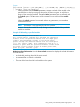
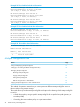

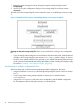
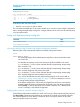
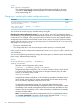
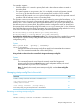
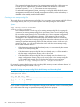
Table Of Contents
- Switch Software
- Contents
- 1 Commands found in the Basic Operation Guide
- 2 Getting started
- 3 Using the Menu Interface
- 4 Using the Command Line Interface (CLI)
- Overview
- Accessing the CLI
- Using the CLI
- Return message types with CLI commands
- CLI interactive commands
- CLI control and editing
- 5 Using the HP WebAgent
- 6 Switch memory and configuration
- Overview
- Configuration file management
- Using the CLI to implement configuration changes
- Creating a custom default configuration
- Using the menu and WebAgent to implement configuration changes configuration file
- Zeroization
- Using Primary and Secondary flash image options
- Multiple configuration files
- Display configuration of selected interface
- Automatic configuration update with DHCP Option 66
- 7 Interface access and system information
- 8 Configuring IP addressing
- Overview
- IP configuration
- Loopback interfaces
- IP Preserve: retaining VLAN-1 IP addressing across configuration file downloads
- Configuring a single source IP address
- 9 Software management
- Downloading switch documentation and software from the web
- Viewing or downloading the software manual set
- Downloading software updates for your switch
- Software signing and verification
- Saving configurations while using the CLI
- Important: Best Practices for software updates
- Updating the switch: overview
- Updating the switch: detailed steps
- Rolling back switch software
- Viewing or transferring alternate configuration files
- Downloading switch documentation and software from the web
- Index

Example 56 The scheduled reload at information
HP Switch(config)# reload at 23:45
Reload scheduled at 23:45:47 6/16/2012
(in 0 days, 1 hours, 41 minutes
HP Switch(config)# show reload at
Reload scheduled for 23:45:47 06/16/2012
(in 0 days, 1 hours, 40 minutes)
HP Switch(config)# show reload after
Reload scheduled for 23:45:47 6/16/2012
(in 0 days, 1 hours, 40 minutes)
Example 57 The scheduled reload after information
HP Switch(config)# reload after 35
Reload scheduled in 0 days, 0 hours, 35 minutes
HP Switch(config)# show reload at
Reload scheduled in 0 days, 0 hours, 34 minutes
HP Switch(config)# show reload after
Reload scheduled in 0 days, 0 hours, 34 minutes
Example 58 The module reload information
HP Switch(config)# show reload module
Module Reload information:
Module | Last reload date
-------+---------------------
C 10:50:51 01/13/2012
Multiple configuration files
PageAction
77Listing and Displaying Startup-Config Files
78Changing or Overriding the Reboot Configuration Policy
Managing Startup-Config Files
79Renaming Startup-Config Files
80Copying Startup-Config Files
81Erasing Startup-Config Files
82Effect of Using the Clear + Reset Buttons
83Copying Startup-Config Files to or from a Remote Server
This method of operation means that you cannot preserve different startupconfig files across a
reboot without using remote storage.
The switch allows up to three startup-config files with options for selecting which startup-config file
to use for:
• A fixed reboot policy using a specific startup-config file for a specific boot path (primary or
secondary flash)
• Overriding the current reboot policy on a per-instance basis
74 Switch memory and configuration