
Basic Operation Guide 2013/06

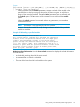
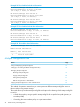

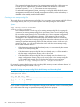
Table Of Contents
- Switch Software
- Contents
- 1 Commands found in the Basic Operation Guide
- 2 Getting started
- 3 Using the Menu Interface
- 4 Using the Command Line Interface (CLI)
- Overview
- Accessing the CLI
- Using the CLI
- Return message types with CLI commands
- CLI interactive commands
- CLI control and editing
- 5 Using the HP WebAgent
- 6 Switch memory and configuration
- Overview
- Configuration file management
- Using the CLI to implement configuration changes
- Creating a custom default configuration
- Using the menu and WebAgent to implement configuration changes configuration file
- Zeroization
- Using Primary and Secondary flash image options
- Multiple configuration files
- Display configuration of selected interface
- Automatic configuration update with DHCP Option 66
- 7 Interface access and system information
- 8 Configuring IP addressing
- Overview
- IP configuration
- Loopback interfaces
- IP Preserve: retaining VLAN-1 IP addressing across configuration file downloads
- Configuring a single source IP address
- 9 Software management
- Downloading switch documentation and software from the web
- Viewing or downloading the software manual set
- Downloading software updates for your switch
- Software signing and verification
- Saving configurations while using the CLI
- Important: Best Practices for software updates
- Updating the switch: overview
- Updating the switch: detailed steps
- Rolling back switch software
- Viewing or transferring alternate configuration files
- Downloading switch documentation and software from the web
- Index

Enables a scheduled warm reboot of the switch. The switch boots up with the same startup config
file and using the same flash image as before the reload.
CAUTION: When using redundant management, the reload at/after command causes a switchover
at the scheduled time to the other management module, which may not be running the same
software image or have the same configurations.
Parameters include:
• after: Schedules a warm reboot of the switch after a given amount of time has passed.
• at: Schedules a warm reboot of the switch at a given time.
The no form of the command removes a pending reboot request.
For more details and examples, see below.
The scheduled reload feature removes the requirement to physically reboot the switch at inconvenient
times (for example, at 1:00 in the morning). Instead, a reload at 1:00 mm/dd command can be
executed (where mm/dd is the date the switch is scheduled to reboot).
NOTE: Configuration changes are not saved with reload at or reload after commands. No
prompt to save configuration file changes is displayed. See Table 6 on page 69.
Examples of scheduled reload commands:
• To schedule a reload in 15 minutes:
HP Switch# reload after 15
• To schedule a reload in 3 hours:
HP Switch# reload after 03:00
• To schedule a reload for the same time the following day:
HP Switch# reload after 01:00:00
• To schedule a reload for the same day at 12:05:
HP Switch# reload at 12:05
• To schedule a reload for some future date:
HP Switch# reload at 12:05 01/01/2008
Example 54 The reload command with a redundant management system
HP Switch(config)# reload after 04:14:00
Reload scheduled in 4 days, 14 hours, 0 minutes
This command will cause a switchover at the scheduled
time to the other management module which may not be
running the same software image and configurations.
Do you want to continue [y/n]?
Module reload. The module reload feature allows you to reset a module by initiating a warm reboot
of a specified module or modules. This saves time over rebooting the entire switch, which can take
several minutes to complete and disrupts all users on the switch. The specified module has its power
turned off, and then turned on again. This causes the module to reset to a known good state and
reload its software.
72 Switch memory and configuration