
Basic Operation Guide 2013/06


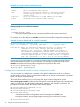


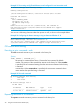
Table Of Contents
- Switch Software
- Contents
- 1 Commands found in the Basic Operation Guide
- 2 Getting started
- 3 Using the Menu Interface
- 4 Using the Command Line Interface (CLI)
- Overview
- Accessing the CLI
- Using the CLI
- Return message types with CLI commands
- CLI interactive commands
- CLI control and editing
- 5 Using the HP WebAgent
- 6 Switch memory and configuration
- Overview
- Configuration file management
- Using the CLI to implement configuration changes
- Creating a custom default configuration
- Using the menu and WebAgent to implement configuration changes configuration file
- Zeroization
- Using Primary and Secondary flash image options
- Multiple configuration files
- Display configuration of selected interface
- Automatic configuration update with DHCP Option 66
- 7 Interface access and system information
- 8 Configuring IP addressing
- Overview
- IP configuration
- Loopback interfaces
- IP Preserve: retaining VLAN-1 IP addressing across configuration file downloads
- Configuring a single source IP address
- 9 Software management
- Downloading switch documentation and software from the web
- Viewing or downloading the software manual set
- Downloading software updates for your switch
- Software signing and verification
- Saving configurations while using the CLI
- Important: Best Practices for software updates
- Updating the switch: overview
- Updating the switch: detailed steps
- Rolling back switch software
- Viewing or transferring alternate configuration files
- Downloading switch documentation and software from the web
- Index

(Differentiated-Services Codepoint)
value and 802.1p priority.
type-of-serviceConfigure the Type-of-Service
method the device uses to
prioritize IP traffic.
Listing commands options
You can use the CLI to remind you of the options available for a command by entering command
keywords followed by ?. For example, suppose you want to see the command options for configuring
the console settings:
Example 13 How to list the options for a specific command
HP Switch(config)# console
baud-rate Set the data transmission speed for the device connect
sessions initiated through the Console port.
events Set level of the events displayed in the device's Events
Log.
flow-control Set the Flow Control Method; default is xon-xoff.
idle-timeout The number of seconds of no activity detected before the
switch terminates a session.
inactivity-timer [deprecated] Set the number of minutes of no activity
detected before the switch terminates a communication
session.
local-terminal Set type of terminal being used for the current console
or telnet session (default is vt100).
screen-refresh Set refresh time for menu status and counters in
seconds.
terminal Set type of terminal being used for all console and
telnet sessions (default is vt100).
Displaying CLI “Help”
CLI Help provides two types of context-sensitive information:
• Command list with a brief summary of each command’s purpose
• Detailed information on how to use individual commands
Displaying command-list Help.
Syntax:
help
Displays a listing of command Help summaries for all commands available at the
current privilege level. That is, at the Operator level, executing
help
displays the
Help summaries only for Operator-Level commands. At the Manager level, executing
help
displays the Help summaries for both the Operator and Manager levels, and
so on.
For example, to list the Operator-Level commands with their purposes:
Using the CLI 33