
Basic Operation Guide 2013/06


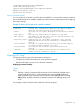
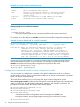


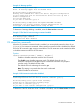
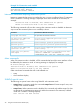
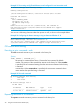
Table Of Contents
- Switch Software
- Contents
- 1 Commands found in the Basic Operation Guide
- 2 Getting started
- 3 Using the Menu Interface
- 4 Using the Command Line Interface (CLI)
- Overview
- Accessing the CLI
- Using the CLI
- Return message types with CLI commands
- CLI interactive commands
- CLI control and editing
- 5 Using the HP WebAgent
- 6 Switch memory and configuration
- Overview
- Configuration file management
- Using the CLI to implement configuration changes
- Creating a custom default configuration
- Using the menu and WebAgent to implement configuration changes configuration file
- Zeroization
- Using Primary and Secondary flash image options
- Multiple configuration files
- Display configuration of selected interface
- Automatic configuration update with DHCP Option 66
- 7 Interface access and system information
- 8 Configuring IP addressing
- Overview
- IP configuration
- Loopback interfaces
- IP Preserve: retaining VLAN-1 IP addressing across configuration file downloads
- Configuring a single source IP address
- 9 Software management
- Downloading switch documentation and software from the web
- Viewing or downloading the software manual set
- Downloading software updates for your switch
- Software signing and verification
- Saving configurations while using the CLI
- Important: Best Practices for software updates
- Updating the switch: overview
- Updating the switch: detailed steps
- Rolling back switch software
- Viewing or transferring alternate configuration files
- Downloading switch documentation and software from the web
- Index

Example 12 The Manager-level command listing
HP Switch# ?
boot Reboot the device.
clear Clear table/statistics or authorized client public
keys.
configure Enter the Configuration context.
copy Copy datafiles to/from the switch.
debug Enable/disable debug logging.
end Return to the Manager Exec context.
erase Erase stored data files.
getMIB Retrieve and display the value of the MIB objects
specified
kill Kill other active console, telnet, or ssh sessions.
licenses Manage premium features.
log Display log events.
print Execute a command and redirect its output to the device
channel for current session.
redo Re-execute a command from history.
redundancy Redundancy configuration for management modules.
reload Warm reboot of the switch.
rename Change the name of the configuration OLDNAME to
NEWNAME.
repeat Repeat execution of a previous command.
services Display parameters for the services module or change
--MORE -- next page: Space, next line: Enter, quit: Control-C
When - - MORE - - appears, there are more commands in the listing. To list the next screen of
commands, press the Space bar. To list the remaining commands one-by-one, repeatedly press
[Enter].
Typing ? at the Global Configuration level or the Context Configuration level produces similar
results.
Use [Tab] To search for or complete a command word. You can use [Tab] to help you find CLI
commands or to quickly complete the current word in a command. To do so, type one or more
consecutive characters in a command and then press [Tab] (with no spaces allowed). For example,
at the Global Configuration level, if you press [Tab] immediately after typing “t”, the CLI displays
the available command options that begin with “t”. For example:
HP Switch(config)# t [Tab]
tacacs-server
telnet-server
time
timesync
trunk
telnet
terminal
traceroute
HP Switch(config)# t
As mentioned above, if you type part of a command word and press [Tab], the CLI completes the
current word (if you have typed enough of the word for the CLI to distinguish it from other
possibilities), including hyphenated extensions. For example:
HP Switch(config)# port- [Tab]
HP Switch(config)# port-security _
Pressing [Tab] after a completed command word lists the further options for that command.
HP Switch(config)# qos [Tab]
udp-portSet UDP port based priority.
tcp-portSet TCP port based priority.
device-priorityConfigure device-based priority.
dscp-mapDefine mapping between a DSCP
32 Using the Command Line Interface (CLI)