
Basic Operation Guide 2013/06

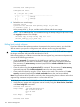
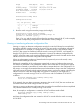
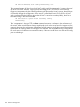
Table Of Contents
- Switch Software
- Contents
- 1 Commands found in the Basic Operation Guide
- 2 Getting started
- 3 Using the Menu Interface
- 4 Using the Command Line Interface (CLI)
- Overview
- Accessing the CLI
- Using the CLI
- Return message types with CLI commands
- CLI interactive commands
- CLI control and editing
- 5 Using the HP WebAgent
- 6 Switch memory and configuration
- Overview
- Configuration file management
- Using the CLI to implement configuration changes
- Creating a custom default configuration
- Using the menu and WebAgent to implement configuration changes configuration file
- Zeroization
- Using Primary and Secondary flash image options
- Multiple configuration files
- Display configuration of selected interface
- Automatic configuration update with DHCP Option 66
- 7 Interface access and system information
- 8 Configuring IP addressing
- Overview
- IP configuration
- Loopback interfaces
- IP Preserve: retaining VLAN-1 IP addressing across configuration file downloads
- Configuring a single source IP address
- 9 Software management
- Downloading switch documentation and software from the web
- Viewing or downloading the software manual set
- Downloading software updates for your switch
- Software signing and verification
- Saving configurations while using the CLI
- Important: Best Practices for software updates
- Updating the switch: overview
- Updating the switch: detailed steps
- Rolling back switch software
- Viewing or transferring alternate configuration files
- Downloading switch documentation and software from the web
- Index
HP Switch-onK1501# show config K1447config <cr>
The command output will show how the K.14.47 config would be interpreted if it were to be used
by the K.15.01.0031 software. Copying the K1447config file to a TFTP server would similarly
trigger an interpretation by the software performing the file transfer. Note, however, that this does
not actually change the configuration. If the version is rolled back from K.15.01.0031 to K.14.47
with a command like the following (given that K.14.47 is stored in secondary flash), the K.14.xx
formatted config is still intact and valid.
HP Switch# boot system flash secondary config
K1447config
This "interpretation" during a TFTP or show command execution is inherent in the architecture of
the switch. When switch features change significantly (such as the move from IPv4 support to IPv6
support), there may be configuration parameters from the previous config that cannot be translated
by the switch for viewing while it is running the new software. This necessitates storing configurations
for each version of software to an external location, if the user would like to view the stored config
prior to reloading it.
138 Software management