
Basic Operation Guide 2013/06
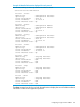



Table Of Contents
- Switch Software
- Contents
- 1 Commands found in the Basic Operation Guide
- 2 Getting started
- 3 Using the Menu Interface
- 4 Using the Command Line Interface (CLI)
- Overview
- Accessing the CLI
- Using the CLI
- Return message types with CLI commands
- CLI interactive commands
- CLI control and editing
- 5 Using the HP WebAgent
- 6 Switch memory and configuration
- Overview
- Configuration file management
- Using the CLI to implement configuration changes
- Creating a custom default configuration
- Using the menu and WebAgent to implement configuration changes configuration file
- Zeroization
- Using Primary and Secondary flash image options
- Multiple configuration files
- Display configuration of selected interface
- Automatic configuration update with DHCP Option 66
- 7 Interface access and system information
- 8 Configuring IP addressing
- Overview
- IP configuration
- Loopback interfaces
- IP Preserve: retaining VLAN-1 IP addressing across configuration file downloads
- Configuring a single source IP address
- 9 Software management
- Downloading switch documentation and software from the web
- Viewing or downloading the software manual set
- Downloading software updates for your switch
- Software signing and verification
- Saving configurations while using the CLI
- Important: Best Practices for software updates
- Updating the switch: overview
- Updating the switch: detailed steps
- Rolling back switch software
- Viewing or transferring alternate configuration files
- Downloading switch documentation and software from the web
- Index
The source IP selection policy
The source IP address selection for the application protocols is defined through assignment of one
of the following policies:
• Outgoing Interface—the IP address of the outgoing IP interface is used as the source IP address.
This is the default policy and the default behavior of applications.
• Configured IP Address—the specific IP address that is used as the source IP address. This
address is configured on one of the switch’s IP interfaces, either a VLAN interface or a Loopback
interface.
• Configured IP Interface—the IP address from the specific IP interface (VLAN or Loopback) is
used as the source IP address. If there are multiple IP addresses assigned (multinetting, for
example), the lowest IP address is used.
If the selection policy cannot be executed because the interface does not have an IP address
configured, does not exist, or is down, the application protocol uses the default Outgoing Interface
policy. A warning message is displayed, but the configuration changes are accepted. When using
the show ip source-interface status command to display information about the source IP address
selection policy, the administratively-assigned source IP selection policy and the actual (operational)
source IP selection policy in effect are displayed. The operational source IP selection policy may
be different from the assigned source selection policy if the IP interface does not exist or is down.
In this case, the default of Outgoing Interface appears as the operational policy (See example
below).
Example 90 The administratively-assigned source IP selection policy differing from the operational
policy
HP Switch(config)# show ip source-interface detail
Source-IP Detailed Information
Protocol : Tacacs
Admin Policy : Configured IP Interface
Oper Policy : Outgoing Interface
Source IP Interface : Vlan 22
Source IP Address : 10.10.10.4
Source Interface State : Down
The no form of the ip source-interface command reverts the application protocols to the default
behavior. The Outgoing Interface policy is used.
Below is an example of assigning a specific source IP address for a RADIUS application. The
administrative policy is Configured IP Address.
Example 91 A specific IP address assigned for the RADIUS application protocol
HP Switch(config)# ip source-interface radius address 10.10.10.2
HP Switch(config)# show ip source-interface radius
Source-IP Configuration Information
Protocol | Admin Selection Policy IP Interface IP Address
-------- + ----------------------- -------------- --------------
Radius | Configured IP Address vlan 3 10.10.10.2
In the example below, a VLAN interface (VLAN 22) is specified as the source IP address for
TACACS. The administrative policy is Configured IP Interface.
122 Configuring IP addressing