
Basic Operation Guide 2013/06
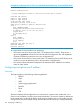
Table Of Contents
- Switch Software
- Contents
- 1 Commands found in the Basic Operation Guide
- 2 Getting started
- 3 Using the Menu Interface
- 4 Using the Command Line Interface (CLI)
- Overview
- Accessing the CLI
- Using the CLI
- Return message types with CLI commands
- CLI interactive commands
- CLI control and editing
- 5 Using the HP WebAgent
- 6 Switch memory and configuration
- Overview
- Configuration file management
- Using the CLI to implement configuration changes
- Creating a custom default configuration
- Using the menu and WebAgent to implement configuration changes configuration file
- Zeroization
- Using Primary and Secondary flash image options
- Multiple configuration files
- Display configuration of selected interface
- Automatic configuration update with DHCP Option 66
- 7 Interface access and system information
- 8 Configuring IP addressing
- Overview
- IP configuration
- Loopback interfaces
- IP Preserve: retaining VLAN-1 IP addressing across configuration file downloads
- Configuring a single source IP address
- 9 Software management
- Downloading switch documentation and software from the web
- Viewing or downloading the software manual set
- Downloading software updates for your switch
- Software signing and verification
- Saving configurations while using the CLI
- Important: Best Practices for software updates
- Updating the switch: overview
- Updating the switch: detailed steps
- Rolling back switch software
- Viewing or transferring alternate configuration files
- Downloading switch documentation and software from the web
- Index

Example 89 Configuration file in TFTP server with dedicated IP addressing, instead of DHCP/Bootp
HP Switch# show run
Running configuration:
; J9091A Configuration Editor; Created on release #K.15.10.0001
hostname "HP Switch"
module 1 type J8702A
module 2 type J8705A
trunk A11-A12 Trk1 Trunk
ip default-gateway 10.10.10.115
snmp-server community "public" Unrestricted
vlan 1
name "DEFAULT_VLAN"
untagged A1,A7-A10,A13-A24,B1-B24,Trk1
ip address 10.12.17.175 255.255.255.0
tagged A4-A6
no untagged A2-A3
exit
vlan 2
name "VLAN2"
untagged A2-A3
no ip address
exit
spanning-tree Trk1 priority 4
password manager
password operator
To summarize the IP Preserve effect on IP addressing:
• If the switch received its most recent VLAN 1 IP addressing from a DHCP/ Bootp server, it
ignores the ip preserve command when it downloads the configuration file, and implements
whatever IP addressing instructions are in the configuration file.
• If the switch did not receive its most recent VLAN 1 IP addressing from a DHCP/Bootp server,
it retains its current IP addressing when it downloads the configuration file.
• The content of the downloaded configuration file determines the IP addresses and subnet
masks for other VLANs.
Configuring a single source IP address
Overview
This feature applies to the following software applications:
• RADIUS
• SFlow
• SNTP
• System Logging applications
• TACACS
• Telnet
• TFTP
The above IP-based software applications use a client-server communication model, that is, the
client’s source IP address is used for unique client identification. The source IP address is determined
by the system and is usually the IP address of the outgoing interface in the routing table. However,
routing switches may have multiple routing interfaces due to load balancing or routing redundancy,
120 Configuring IP addressing