
Basic Operation Guide 2013/06
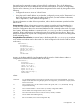
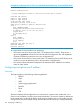
Table Of Contents
- Switch Software
- Contents
- 1 Commands found in the Basic Operation Guide
- 2 Getting started
- 3 Using the Menu Interface
- 4 Using the Command Line Interface (CLI)
- Overview
- Accessing the CLI
- Using the CLI
- Return message types with CLI commands
- CLI interactive commands
- CLI control and editing
- 5 Using the HP WebAgent
- 6 Switch memory and configuration
- Overview
- Configuration file management
- Using the CLI to implement configuration changes
- Creating a custom default configuration
- Using the menu and WebAgent to implement configuration changes configuration file
- Zeroization
- Using Primary and Secondary flash image options
- Multiple configuration files
- Display configuration of selected interface
- Automatic configuration update with DHCP Option 66
- 7 Interface access and system information
- 8 Configuring IP addressing
- Overview
- IP configuration
- Loopback interfaces
- IP Preserve: retaining VLAN-1 IP addressing across configuration file downloads
- Configuring a single source IP address
- 9 Software management
- Downloading switch documentation and software from the web
- Viewing or downloading the software manual set
- Downloading software updates for your switch
- Software signing and verification
- Saving configurations while using the CLI
- Important: Best Practices for software updates
- Updating the switch: overview
- Updating the switch: detailed steps
- Rolling back switch software
- Viewing or transferring alternate configuration files
- Downloading switch documentation and software from the web
- Index

User-defined loopback addresses provide the following benefits:
• A loopback interface is a virtual interface that is always up and reachable as long as at least
one of the IP interfaces on the switch is operational. As a result, a loopback interface is useful
for debugging tasks since its IP address can always be pinged if any other switch interface
is up.
• You can use a loopback interface to establish a Telnet session, ping the switch, and access
the switch through SNMP, SSH, and HTTP (WebAgent).
• A loopback IP address can be used by routing protocols. For example, you can configure the
loopback IP address as the router ID used to identify the switch in an OSPF area. Because the
loopback interface is always up, you ensure that the switch's router ID remains constant and
that the OSPF network is protected from changes caused by downed interfaces.
NOTE: OSPF does not require that you use an IP address as the router ID. OSPF only requires
the router ID to be a unique value within the autonomous system (AS). However, if you configure
the loopback IP address as the router ID, OSPF can reach the switch if any switch interface is up.
(Normally, OSPF automatically configures the router ID with the IP address of a switch interface.
The disadvantage is that if the interface goes down, OSPF can no longer ping the switch using the
router ID even if other interfaces are operational.)
For more information about how to configure a loopback IP address to participate in an OSPF
broadcast area, refer to the section titled "(Optional) Assigning Loopback Addresses to an Area"
in the Multicast and Routing Guide.
Configuring a loopback interface
To configure a loopback interface, enter the interface loopback command at the global configuration
level of the CLI:
Syntax:
[no] interface loopback <number>
Creates a loopback interface, where <number> is a value from 1 to 7. Use the no
form of the command to remove the loopback interface.
Note: You cannot remove the default loopback interface (number 0) with IP address
127.0.0.1.
You can configure up to thirty-two IP addresses on a loopback interface. To configure an IP address
for the loopback interface, enter the ip address <ip address> command at the loopback interface
configuration level as shown in the following example.
Note that when you configure an IP address for a loopback interface, you do not specify a network
mask. The default subnet mask 255.255.255.255 is used.
Loopback interfaces 115