
Basic Operation Guide 2013/06
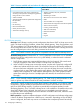
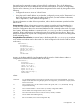
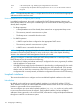
Table Of Contents
- Switch Software
- Contents
- 1 Commands found in the Basic Operation Guide
- 2 Getting started
- 3 Using the Menu Interface
- 4 Using the Command Line Interface (CLI)
- Overview
- Accessing the CLI
- Using the CLI
- Return message types with CLI commands
- CLI interactive commands
- CLI control and editing
- 5 Using the HP WebAgent
- 6 Switch memory and configuration
- Overview
- Configuration file management
- Using the CLI to implement configuration changes
- Creating a custom default configuration
- Using the menu and WebAgent to implement configuration changes configuration file
- Zeroization
- Using Primary and Secondary flash image options
- Multiple configuration files
- Display configuration of selected interface
- Automatic configuration update with DHCP Option 66
- 7 Interface access and system information
- 8 Configuring IP addressing
- Overview
- IP configuration
- Loopback interfaces
- IP Preserve: retaining VLAN-1 IP addressing across configuration file downloads
- Configuring a single source IP address
- 9 Software management
- Downloading switch documentation and software from the web
- Viewing or downloading the software manual set
- Downloading software updates for your switch
- Software signing and verification
- Saving configurations while using the CLI
- Important: Best Practices for software updates
- Updating the switch: overview
- Updating the switch: detailed steps
- Rolling back switch software
- Viewing or transferring alternate configuration files
- Downloading switch documentation and software from the web
- Index

Syntax:
ip default-gateway <ip-address>
For example:
HP Switch(config)# ip default-gateway 10.28.227.115
NOTE: The switch uses the IP default gateway only while operating as a Layer 2 device. While
routing is enabled on the switch, the IP default gateway is not used. Thus, to avoid loss of Telnet
access to off-subnet management stations, you should use the ip route command to configure a
static (default) route before enabling routing. For more information, refer to the chapter titled "IP
Routing Features" in the Multicast and Routing Guide for your switch.
Configure Time-To-Live (TTL). The maximum number of routers (hops) through which a packet can
pass before being discarded. (The default is 64.) Each router decreases a packet’s TTL by 1 before
forwarding the packet. If a router decreases the TTL to 0, the router drops the packet instead of
forwarding it.
Syntax:
ip ttl <number-of-hops>
HP Switch(config)# ip ttl 60
In the CLI, you can execute this command only from the global configuration level. The TTL default
is 64, and the range is 2 - 255.
WebAgent: configuring IP addressing
You can use the WebAgent to access IP addressing only if the switch already has an IP address
that is reachable through your network.
1. In the navigation pane, click on Home.
2. Click on Quick Setup.
3. In the Switch Quick Setup Parameters box, click on Change.
4. Enter the IP address and any other information such as the Subnet mask and Gateway.
5. Click on Save to save your changes.
6. If you need further information on using the WebAgent, click on [?] to access the web-based
help available for the switch.
How IP addressing affects switch operation
Without an IP address and subnet mask compatible with your network, the switch can be managed
only through a direct terminal device connection to the Console RS-232 port. You can use
direct-connect console access to take advantage of features that do not depend on IP addressing.
However, to realize the full capabilities HP proactive networking offers through the switch, configure
the switch with an IP address and subnet mask compatible with your network. The following table
lists the general features available with and without a network-compatible IP address configured.
Table 7 Features available with and without IP addressing on the switch
Additional Features Available with an IP Address and
Subnet Mask
Features Available Without an IP Address
• WebAgent access, with configuration, security, and
diagnostic tools, plus the Alert Log for discovering
• Direct-connect access to the CLI and the menu interface
• DHCP or Bootp support for automatic IP address
configuration, and DHCP support for automatic Timep
server IP address configuration
problems detected in the switch along with suggested
solutions
• SNMP network management access such as PCM+ for
network configuration, monitoring, problem-finding and
• Multiple Spanning Tree Protocol
• Port settings and port trunking
reporting, analysis, and recommendations for changes
to increase control and uptime
• Switch meshing
IP configuration 111