
Basic Operation Guide 2013/06
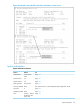
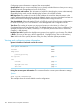

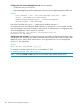

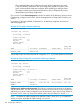
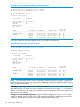
Table Of Contents
- Switch Software
- Contents
- 1 Commands found in the Basic Operation Guide
- 2 Getting started
- 3 Using the Menu Interface
- 4 Using the Command Line Interface (CLI)
- Overview
- Accessing the CLI
- Using the CLI
- Return message types with CLI commands
- CLI interactive commands
- CLI control and editing
- 5 Using the HP WebAgent
- 6 Switch memory and configuration
- Overview
- Configuration file management
- Using the CLI to implement configuration changes
- Creating a custom default configuration
- Using the menu and WebAgent to implement configuration changes configuration file
- Zeroization
- Using Primary and Secondary flash image options
- Multiple configuration files
- Display configuration of selected interface
- Automatic configuration update with DHCP Option 66
- 7 Interface access and system information
- 8 Configuring IP addressing
- Overview
- IP configuration
- Loopback interfaces
- IP Preserve: retaining VLAN-1 IP addressing across configuration file downloads
- Configuring a single source IP address
- 9 Software management
- Downloading switch documentation and software from the web
- Viewing or downloading the software manual set
- Downloading software updates for your switch
- Software signing and verification
- Saving configurations while using the CLI
- Important: Best Practices for software updates
- Updating the switch: overview
- Updating the switch: detailed steps
- Rolling back switch software
- Viewing or transferring alternate configuration files
- Downloading switch documentation and software from the web
- Index
This command displays the IP addressing for each VLAN configured in the switch.
If only the DEFAULT_VLAN exists, then its IP configuration applies to all ports in the
switch. Where multiple VLANs are configured, the IP addressing is listed per VLAN.
The display includes switch-wide packet time-to-live, and (if configured) the switch’s
default gateway and Timep configuration.
(You can also use the show management command to display the IP addressing and time server
IP addressing configured on the switch. See the Management and Configuration Guide for your
switch.)
For example, in the factory-default configuration (no IP addressing assigned), the switch’s IP
addressing appears as:
Example 79 The switch’s default IP addressing
HP Switch> show ip
Internet (IP) Service
IP Routing : Disabled
Default Gateway :
Default TTL : 64
Arp Age : 20
Domain Suffix :
DNS server :
| Proxy ARP
VLAN | IP Config IP Address Subnet Mask Std Local
--------------------- + ---------- --------------- -------------- ----------
DEFAULT_VLAN | DHCP/Bootp
With multiple VLANs and some other features configured, show ip provides additional information:
Example 80 Show IP listing with non-default IP addressing configured
HP Switch(config)# show ip
Internet (IP) Service
IP Routing : Disabled
Default Gateway : 10.20.227.1
Default TTL : 64
Arp Age : 20
Domain Suffix :
DNS server :
| Proxy ARP
VLAN | IP Config IP Address Subnet Mask Std Local
--------------------- + ---------- --------------- -------------- ----------
DEFAULT_VLAN | Manual 10.28.227.101 255.255.248.0 No No
VLAN22 | Disabled
Configure an IP address and subnet mask. The following command includes both the IP address
and the subnet mask. You must either include the ID of the VLAN for which you are configuring IP
addressing or go to the context configuration level for that VLAN. (If you are not using VLANs on
the switch—that is, if the only VLAN is the default VLAN—then the VLAN ID is always "1".)
NOTE: The default IP address setting for the DEFAULT_VLAN is DHCP/Bootp. On additional
VLANs you create, the default IP address setting is disabled.
108 Configuring IP addressing