
- Hewlett-Packard Projector Reference Guide







14 Reference Guide
Installation and Setup
Remote control
✎
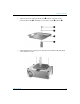
Before using the remote control, install two AAA batteries.
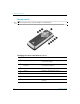
Identifying the remote control with case closed
Symbol Item Function
1
Page up and page down Scrolls up and down through pages on a
connected computer.
2
Left-click and right-click mouse
functions
Performs left-click and right-click functions for
a connected computer.
3
Hide Hides the display.
4
Source Switches to the next input source.
5
Power Powers on and off the projector.
6
Laser ring Turns on the laser pointer.
7
Mouse button Moves the mouse pointer on a connected
computer.