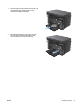
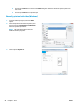
4. Push the paper into the product until it stops, and
then push the paper length guide in so the
extender tool supports the paper.
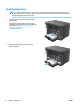
5. When nished printing on short paper, remove
the short-paper extender tool from the input
tray, and then place it in the storage slot.
ENWW Load the input tray 17