
User guide




Print pictures
You can print pictures on your AirLife over a Wi-Fi network using a Hewlett-Packard printer. For
example, if you have an HP printer connected to your home Wi-Fi network, you can connect your
AirLife to your home network, and then print a picture using the HP printer.
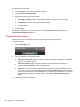
1. Open the App Drawer, and then touch Photo.
2. Touch a photo twice to open it in full screen mode.
3. On the keyboard, press MENU, touch More, and then touch Print.
4. Your AirLife searches for networked printers. Next, touch the printer you prefer to use, and then
touch Print.
Compatible HP printers:
Business Inkjet 10XX Officejet Pro 80XX Photosmart C309XX
Business Inkjet 11XX Officejet Pro 85XX Photosmart C31XX
Business Inkjet 12XX Officejet Pro K53XX Photosmart C41XX
Color Inkjet cpXX Officejet Pro K54XX Photosmart C42XX
Deskjet 450XX Officejet Pro K550XX Photosmart C43XX
Deskjet 460XX Officejet Pro K850XX Photosmart C44XX
Deskjet 51XX Officejet Pro K86XX Photosmart C45XX
Deskjet 57XX Officejet Pro L73XX Photosmart C46XX
Deskjet 66XX Officejet Pro L74XX Photosmart C51XX
Deskjet 68XX Officejet Pro L75XX Photosmart C52XX
Deskjet 69XX Officejet Pro L76XX Photosmart C53XX
Deskjet 96XX Officejet Pro L77XX Photosmart C55XX
Deskjet 98XX Photosmart 31XX Photosmart C61XX
Deskjet D25XX Photosmart 32XX Photosmart C62XX
Deskjet D730XX Photosmart 33XX Photosmart C63XX
Deskjet F42XX Photosmart 37XX Photosmart C71XX
Deskjet F44XX Photosmart 38XX Photosmart C72XX
Deskjet F735XX Photosmart 47XX Photosmart C81XX
Officejet 60XX Photosmart 82XX Photosmart D506XX
Officejet 61XX Photosmart 84XX Photosmart D51XX
Officejet 63XX Photosmart 87XX Photosmart D53XX
Officejet 65XX Photosmart A31XX Photosmart D54XX
Officejet 73XX Photosmart A32XX Photosmart D61XX
Officejet 74XX Photosmart A43XX Photosmart D71XX
Print pictures 63