
User guide





Status and notification icons
Status bar
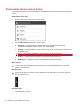
The status bar is located on the top of the screen. The left side displays notification icons and the
right side displays the network connection status.
Notification icons
You can open the Notification Drawer to open a new message, reminder, or event notification.
New email message Problem
New text or multimedia
message
Storage card is full
Problem with text or
multimedia message delivery
Touch to view additional
notifications.
New instant message Uploading data
Upcoming event Downloading data
Music is playing Content downloaded
Status icons
GPRS connected Signal strength
GPRS in use Roaming
EDGE connected No signal
Data upload and download
over EDGE connection.
No SIM card installed
3G connected Battery is very low
Data upload and download
over 3G connection.
Battery is low
Connected to a Wi-Fi network Battery is full
Bluetooth is on Battery is charging
Connected to another
Bluetooth device
GPS is on
Status and notification icons 15