
Cisco Software Activation Document for HP



8
Cisco Software Activation Document for HP
OL-12769-01
Software Activation
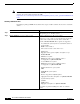
Note For information about the license and show license privileged EXEC commands, see the Cisco IOS
Software Licensing feature module at this URL:
http://www.cisco.com/en/US/products/sw/iosswrel/ps5012/products_feature_guide09186a00807afa10.
html
Installing a Software License
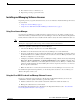
Beginning in privileged EXEC mode, follow these steps to install a software license and to restart the
switch.
Command Purpose
Step 1
Log in to the switch through the console port, the Ethernet
management port, or a Telnet session.
Step 2
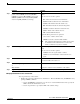
license install file-sys:file-sys//lic-location Install a software license file on the switch.
Use the file-sys:file-sys//lic-location parameter to specify the
location of the software license file on the switch. The
filename is license-file.xml. These options are supported:
• Local flash file system syntax on a standalone switch or
stack member:
flash member-number:
The member-number can be from 1 to 9.
• FTP syntax:
ftp:[[//username[:password]@location]/directory]/
license-file.xml
• HTTP server syntax:
http://[[username:password]@]{hostname |
host-ip}[/directory]/license-file.xml
• Secure HTTP server syntax:
https://[[username:password]@]{hostname |
host-ip}[/directory]/license-file.xml
• Null destination for copies syntax:
null:
• NVRAM file system syntax:
nvram:
• Remote Copy Protocol (RCP) syntax:
rcp:[[//username@location]/directory]/license-file.xml
• System memory syntax:
system:
• TFTP syntax:
tftp:[[//location]/directory]/license-file.xml
Repeat this step when installing more than one software
license.